Posts

Showing posts with the label AWS

AWS EC2 Instances Per-Second Billing

Image
AWS announced per-second billing for EC2 and EBS Volumes Effective October 2, 2017 Available for On-Demand, Reserved, and Spot Instance Types EBS Storage gains same benefits as well Also applies to Amazon EMR and AWS Batch Amazon Web Services provides flexible, secure and scalable cloud platform for the masses, and according to the Gartner Research, is a leader in this field. Today, they announced another useful feature which will change the level of the playing field again: Effective 10/02/2017, usage of Linux instances that are launched in On-Demand, Reserved, and Spot form will be billed in one-second increments. Similarly, provisioned storage for EBS volumes will be billed in one-second increments. Per-second billing also applies to Amazon EMR and AWS Batch. AWS is used by more than 1 million people from "organizations of every size across nearly every industry," Jeff Bezos wrote in his letter to shareholders. Per-second Billing Advantages With...

Enable HTTP/2 Support in AWS ELB

Image
This thread  was started more than a year ago, asking for when Amazon Web Services will add support for HTTP/2  into their ELB. In addition to that, people are also asking, how to configure ELB to support multiple SSL certificates. AWS support team has been reluctant on giving out any specific details on when both of these features will be available, citing: I've verified that the ELB team is aware of the interest in ELB supporting HTTP/2. Please keep an eye on What's New from Amazon Web Services: http://aws.amazon.com/new/ for any updates. What is HTTP/2? HTTP/2 is a replacement for how HTTP is expressed “on the wire.” It is not a ground-up rewrite of the protocol; HTTP methods, status codes and semantics are the same, and it should be possible to use the same APIs as HTTP/1.x (possibly with some small additions) to represent the protocol. HTTP/2 protocol is supported by major modern browsers including IE11, Edge 13, Firefox 47, Chrome 52, Safari 9.1, Opera 38, ...

Amazon Announced New S3 Usability Enhancements

Image
Amazon S3 Adds Two New Long-Awaited Features Bucket Limit Increase You can now increase your Amazon S3 bucket limit per AWS account. All AWS accounts have a default bucket limit of 100 buckets, and starting today you can now request additional buckets by visiting AWS Service Limits. Read-after-write Consistency Amazon S3 now supports read-after-write consistency for new objects added to Amazon S3 in US Standard region. Prior to this announcement, all regions except US Standard supported read-after-write consistency for new objects uploaded to Amazon S3. With this enhancement, Amazon S3 now supports read-after-write consistency in all regions for new objects added to Amazon S3. Read-after-write consistency allows you to retrieve objects immediately after creation in Amazon S3. Now go ahead and bump the # of S3 buckets in AWS Service Limits page.

Getting Started With AWS Aurora - Part 1

Image
AWS announced Aurora  MySQL compatible database engine last November. Aurora is a fully-managed, MySQL-compatible, relational database engine that combines the speed and availability of high-end commercial databases with the simplicity and cost-effectiveness of open source databases. What is AWS Aurora? Amazon Aurora is a relational database engine that combines the speed and reliability of high-end commercial databases with the simplicity and cost-effectiveness of open source databases. It delivers up to five times the throughput of standard MySQL running on the same hardware. Amazon Aurora increases MySQL performance and availability by tightly integrating the database engine with an SSD-backed virtualized storage layer purpose-built for database workloads. Amazon Aurora's storage is fault-tolerant and self-healing. If the entire instance fails, Amazon Aurora will automatically failover to one of up to 15 read replicas. MySQL 5.6 Compatibility According to the AWS...

How to disable AWS OpsWorks Auto-Update

Image
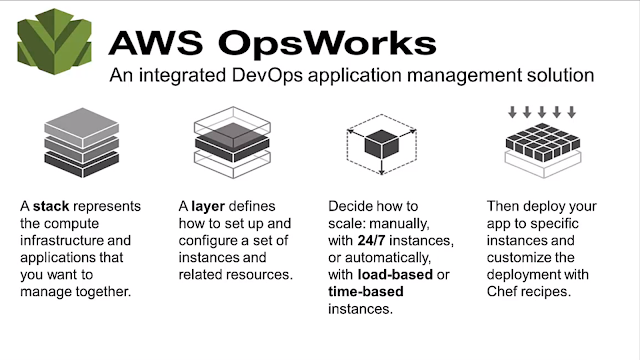
AWS OpsWorks. Image courtesy of Amazon Web Services Does AWS OpsWorks drive you nuts with its auto-update feature eating up your resources and messing up your deployments? There is now a solution to mitigate that, with manageable agent updates. This recently-added feature allows you to select if you'd like to opt in for agent auto-updates or would you like to stick to a specific (and tested by you) version of AWS OpsWorks. Go to  Add Stack  page, in the  OpsWorks Agent Version  field, choose  Manual update  and pick a version. Try this out today by editing one of your stacks to specify an agent version (be sure to do this in your test environment first). This updates the agents and cookbooks on all online instances in that stack immediately. Click the  Changelog  link to learn about the changes that come with the new agent. You can also update the agent on a single instance instead of the entire stack by selecting a version on the...

AWS Announced Simplified Reserved Instances (no-upfront)

Image
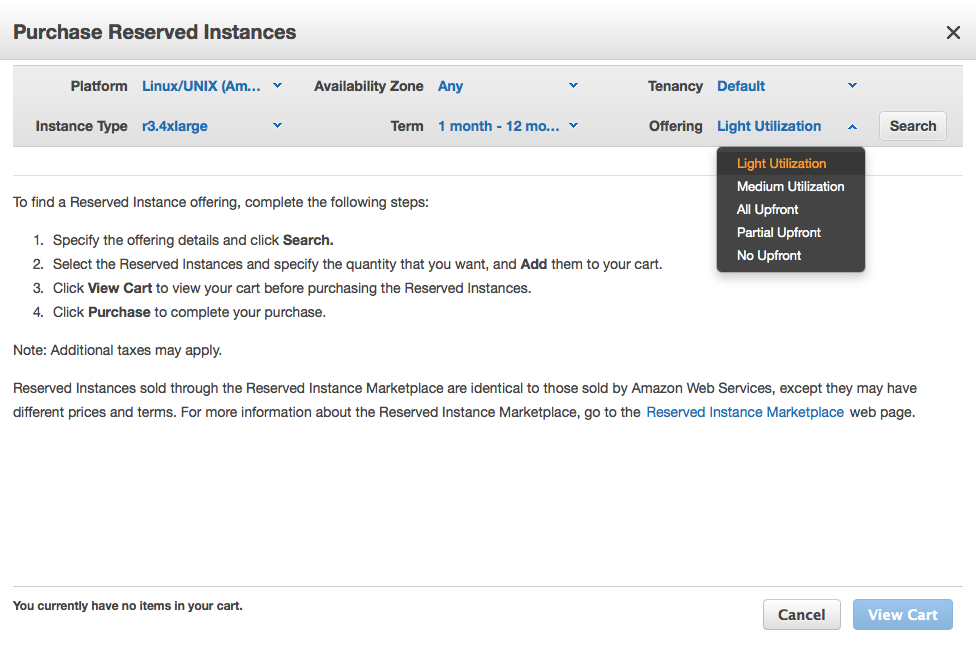
Simplifying the EC2 Reserved Instance Model There is now a single type of Reserved Instance and it has three payment options. All of the options continue to provide capacity assurance and discounts that are typically around 63% for a three year term when compared to On-Demand prices. There are three payment options that so that you can decide how you would like to pay for your Reserved Instance throughout the term (in descending order of effective discount), and you can find these new options under the Offering  settings when purchasing Reserved Instances: All Upfront -  You pay for the entire Reserved Instance term (one or three years) with one upfront payment and get the best effective hourly price when compared to On-Demand. Partial Upfront -  You pay for a portion of the Reserved Instance upfront, and then pay for the remainder over the course of the one or three year term. This option balances the RI payments between upfront and hourly No Upfront -...

AWS Announces New Compute-Optimized EC2 Instances

Image
New, "Explosive" C4 instance type from AWS It has been a while since Amazon Web Services (AWS) announced new cloud hardware. For those unfamiliar with the cloud: yes, even cloud computing need actual hardware to run. The update will brings new, explosive c4 compute-optimized instance type on board, and while I still cannot see this type in my AWS console, I'm sure the promised architecture behind it will be good one. Apparently AWS has ordered the specific Haswell CPU from Intel, designed just for EC2: The new C4 instances are based on the Intel Xeon E5-2666 v3 (code name Haswell ) processor. This custom processor, designed specifically for EC2 , runs at a base speed of 2.9 GHz, and can achieve clock speeds as high as 3.5 GHz with Turbo boost. These instances are designed to deliver the highest level of processor performance on EC2.  As said, there are no CPU benchmarks available yet, but I was quite surprised on their c3.large instance type performance and it h...

Amazon ElastiCache Multi-AZ Placement

Image
Amazon ElastiCache can be configured in Multi-AZ setup (or as they call it "Flexible Node Placement"). Your Memcached Cache Clusters can now span multiple Availability Zones within a Region, improving reliability and availability of the Cluster. And, if you are still using old cache.m1 instances, see this article about new M3 and R3 instances  and upgrade for better and more reliable hardware. You can now choose the Availability Zone for new nodes when you create a new Cache Cluster or add more nodes to an existing Cluster. You can specify the new desired number of nodes in each Availability Zone or you can simply choose the Spread Nodes Across Zones option. The feature is available exclusively to memcached cluster only.

PHP Developer Cloud to be Closed on September 7, 2014

Image
I received today email notification from Zend Developer Cloud stating that the PHP Developer Cloud (phpcloud.com) will be closed on 09/07/14 for good. Quite surprise (and not so much) from a company as great as Zend. Just FYI - I tried their service only once and after 48 hours of waiting for my virtual instance to become available, I gave up. For your reference, here's the copy of whole email sent today:   Hi Jaan, You are receiving this email because you have created PHP containers on the  phpcloud.com  - Zend Developer Cloud.   When we launched Zend Developer Cloud in 2011, there were few options for PHP developers to experience Cloud development. We set out to deliver a development-only Cloud environment that could provide you a simple and frictionless way to experience development in the Cloud. In parallel, we began working with the leading cloud providers to define Zend Server-based environments that could run your projects at scale once th...

Amazon RDS Added Support for Second Generation Standard Instances

Image
Amazon Web Services announced General Availability of second-gen Standard instances (M3) in Amazon RDS, making RDS even better with almost 50% more computing power thanks to new hardware architecture (Intel Xeon E5-2670 CPU) and about 6% lower cost. In my previous post I wrote how did I upgrade db.m1.large to 1000IOPS which resulted single-digit ms MySQL read latency  - that was pretty nice surprise. This time I've decided to take advantage of faster CPU and lower cost offered by db.m3.large instance type. I was pretty aware that m3.large instance type is not EBS optimized (only db.m3.xlarge and above is) and was ready for performance drop, luckily it never happened - charts read the same except CPU load which seems to have dropped ~ 10%. Because I had multi-AZ RDS setup, the failover took ~ 30 seconds and upgrade was completed in 8 minutes. Nice. Amazon RDS Dashboard My recommendation is to upgrade your db.m1 instance type to db.m3 as soon as you can - not only you will ...

Reason to Upgrade Your RDS MySQL instance to Provisioned IOPS

Image
High-performance, provisioned IOPS storage was available in Amazon RDS for more than a year ago, as you can read from AWS article published on 9/25/2012. Recently our MySQL database has grown and contains more than 200 databases, with some of them containing millions of rows (and growing rapidly). Our Multi-AZ RDS instance is db.m1.large which provides pretty decent performance even when it is not EBS optimized. Squeezing more performance was one of my goals when decided to take the road to enable IOPS. You can start from 1000 IOPS with 1000 IOPS increments. I decided to go with 1000 for a start. Process for upgrading Multi-AZ instance is far from complicated - after making your selections through the dashboard UI and deciding to apply changes immediately, instance performs automated fail-over which minimizes the downtime for merely minute or so until DNS reacts to changes. Total upgrade took about 5 hours but system was never down and I did not notice any slowness. Once done, ...

Use 16GB SSD for Swap on Amazon Linux c3.large Instance

Image
Amazon announced new generation C3 instance types , which are compute optimized instances, available in 5 sizes: c3.large, c3.xlarge, c3.2xlarge, c3.4xlarge and c3.8xlarge with 2, 4, 8, 16 and 32 vCPUs respectively. C3 instances will provide you with the highest performance processors and the lowest price/compute performance compared to all other Amazon EC2 instances. C3 instances also feature Enhanced Networking and SSD-based instance storage . For C3 Instances, each vCPU is a hardware hyperthread from 2.8 GHz Intel Xeon E5-2680v2 (Ivy Bridge) processors. Setting up c3.large instance with SSDs When setting up instance, make sure you add both Instance Store volumes. Its up to you how you like to set up your root storage, For this example I opted for 16GB, 480 provisioned IOPS (you need to maintain 30:1 ratio): Testing the SSD speed Once set up and server launched, we can use 2nd 16GB SSD (mounted on /dev/sdc) for swap on new Amazon Linux instance c3.large # Tes...

Elastic Load Balancing Supports Cross-Zone Load Balancing

Image
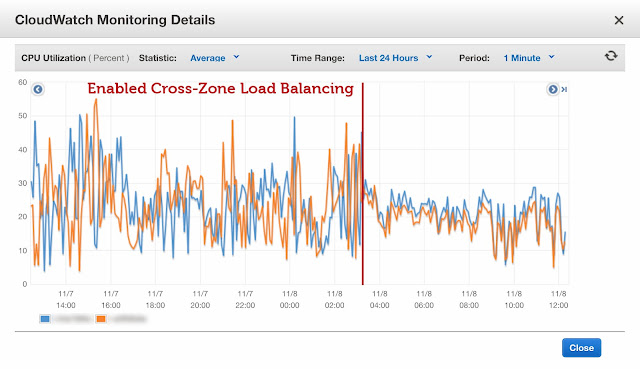
Amazon Web Services announced cross-zone load balancer, which supposed to further improve distribution of requests amongst all the instances behind the load balancer. If you enable cross-zone load balancing, you no longer have to worry that clients caching DNS information will result in requests being distributed unevenly, resulting more even load. I went ahead and tried it out myself. Enabling the Cross-Zone Load Balancing goes through the command line, you need to download and configure the tool on your computer before proceeding. Read the instructions how to download, install and configure ELB command line tools here . List all the load balancers: elb-describe-lbs Enable the cross-zone load balancing elb-modify-lb-attributes loadbalancer-id --crosszoneloadbalancing "enabled=true" Verifying: elb-describe-lb-attributes  loadbalancer-id  --headers CROSS_ZONE_LOADBALANCING  CROSS_ZONE_LOADBALANCING_ATTRIBUTE_VALUE CROSS_ZONE_LOADBALANCING  true ...

AWS OpsWorks - New Resources Tab

Image
AWS OpsWorks updated quietly their back-end today, and introduced new tab called Resources . Most interestingly, I had to update the IP address of one of our client servers because of migration from non-opsworks managed servers to new, OpsWorks managed server. And surprise - there was new tab! What you can do within the Resources tab? Register available volumes to existing stack Assign elastic IP to a different instance (even in different stack) Registering volumes You can find available volume and register volume to a Stack. Then, you can assign the volume to stopped instance, as seen on screen shot. You can change name and mounting point, if needed. Reassigning elastic IPs In my case, I had a server running with elastic IP assigned to it, and I did not want to go in and change A record because it would take too much time and it would probably upset client if DNS update may take up to 72 hours around the globe. Therefore, decided to point elastic IP to n...

OpsWorks: Deploying your PHP Application Without Restarting Apache

Image
For quite a while now I have been trying to exploit AWS OpsWorks to deploy software updates to our MetaSearch Gateway with less manual work. Before using OpsWorks, I built AWS servers from custom AMI, deployed app using git push to remote, and remote deployment hook pulled latest code updates to a folder; and if there were any secondary servers, these were updated with rsync. Now, AWS OpsWorks is great set of tools, based on famous Chef (currently 11.4 is supported). With little efforts I was able to include and configure necessary PHP extensions to a default PHP Web app: APC memcached Mongo Geoip Since AWS supports also elastic load balancer, I have two 24/7 instances running behind ELB, and third server (load-based) waiting for load to increase. Deployments are quite easy, with a push of a button, code is pulled from remote git and symlinks are updated. Sounds good? Well, too good to be true. By default, after deploying your app, Apache restarts itself; and naturally this c...

Amazon Route53 Health Checks Available in CloudWatch

Image
Route 53 Health Checks Website availability is utmost important if your business depends on it. There are lots of free services (and paid services, too) to constantly monitor your site's availability and send you an email if website is not available. Some of these services offer periodic checks for every 15 minutes, some in 5, and only few support checking your site's health every 60 seconds or less. While this sounds good, what can you do about when your site actually is down? Imagine scenario like this: it's 8pm Friday, nobody is in the office, tech support does not pick up the phone. And your website is down, totally. Yes, you received alert, even multiple alerts. Even some clients call, and your competitors rub hands. Here's what you can do: enable Route53 health checks and host backup site in Amazon S3 (the backup site can simply say that "Sorry, we are currently experiencing technical issues; please check back later." - it is 100 times better than...

Amazon RDS Switch to MySQL 5.5

Image
Upgrading your Amazon RDS instance from MySQL version 5.1 to MySQL 5.5 has never been easier, as Amazon Web Services announced earlier this week. Now you can modify your MySQL RDS instance using feature called Major Feature Upgrade . MySQL 5.5 includes several features and performance benefits over MySQL that may be of interest to you including enhanced multi-core scaling, better use of I/O capacity , and enhanced monitoring by means of the performance schema . MySQL 5.5 defaults to version 1.1 of the InnoDB Plugin, which improves on version 1.0 (the default for MySQL 5.1) by adding faster recovery, multiple buffer pool instances, and asynchronous I/O. Here's how you can upgrade your RDS instance: Log in to your AWS Console Go to RDS, and select your instance From Instance Actions  drop down, choose Modify Select latest version of MySQL 5.5 from the drop down, To upgrade immediately, select the Apply Immediately check box. To delay the upgrade to the next maintenance wi...

Amazon AWS Announced Fast Cross-Region EBS Snapshot Copy

Image
Today, Amazon AWS announced yet another performance update to its EC2 Cross-Region EBS Snapshot Copy. Back in December 12, 2012, they announced EBS Snapshot Copy to allow cross-region transfer of existing snapshots for better disaster recovery. Starting today, they claim they will only transfer the data that has changed since your last snapshot copy, thus transferring and storing less data and completing the copy faster. Initiating Snapshot Copy Copy Dialog Copy Progress Even when copying from the first time, the cross-region copy performance is excellent; 10GB disk snapshot was transferred and became available 7 minutes after initiating the copy. EBS Snapshot Copy is simple to use. In the AWS Management Console, you can select the snapshot to be copied, set the destination region, and start the copy. This feature can also be accessed via an EC2 Command Line Interface or an EC2 API. Read more here:  http://docs.aws.amazon.com/AWSEC2/latest/UserGu...

Amazon Announces RDS General Availability

Image
+Amazon Web Services  Relational Database Service (Amazon RDS) is a web service that makes it easy to set up, operate, and scale a relational database in the cloud. Amazon RDS gives you access to the capabilities of a familiar MySQL, Oracle or Microsoft SQL Server database engine. This means that the code, applications, and tools you already use today with your existing databases can be used with Amazon RDS. But RDS it's not just any regular cloud MySQL service. It is being used in large-scale, mission-critical applications such as Samsung SmartTV, Flipboard, Pinterest, AirBNB, NASA JPL and many-many more. We have been using Amazon RDS in Multi-AZ deployment (db.m1.large) for more than a year for our CMS PaaS, and can say only good about it. The only big downtime that we encountered was year ago, when there was major downtime in one of US-East regions which largely affected for example Netflix. Again, thanks to a cloud, we were able to relocate our databases to...

AWS OpsWorks now supports ELB!

Image
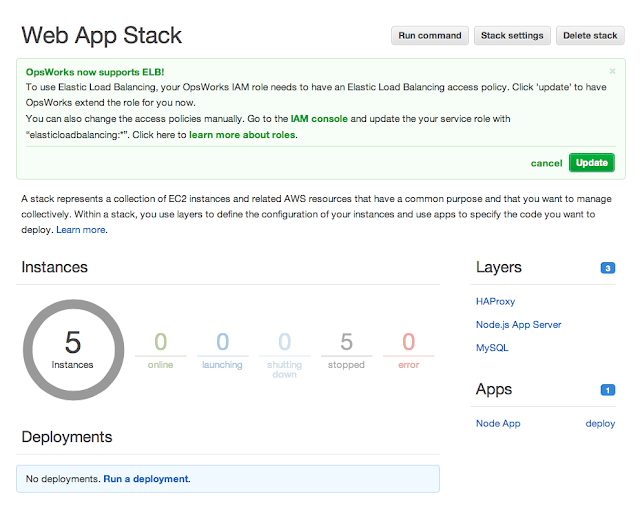
Amazon Web Services announced this long-time waited update to its OpsWorks by adding support to Elastic Load Balancer . During AWS Summit 2013 New York it was mentioned several times that ELB support will be added soon  - I am glad they kept their word. Until now, developers taking advantage of Amazon OpsWorks were forced to bring up one instance as HAProxy; but you can now add Elastic Load Balancing (ELB) to your OpsWorks application stacks and get all the built-in capabilities ELB is known for, including automatic scaling across availability zones. Combining this feature with Amazon Route53 latency based routing , and you have highly available, redundant, scalable application. Related article: AWS OpsWorks supports t1.micro instances