Posts

Showing posts with the label Amazon

How To Attach Your EBS volume to multiple EC2 instances
Image
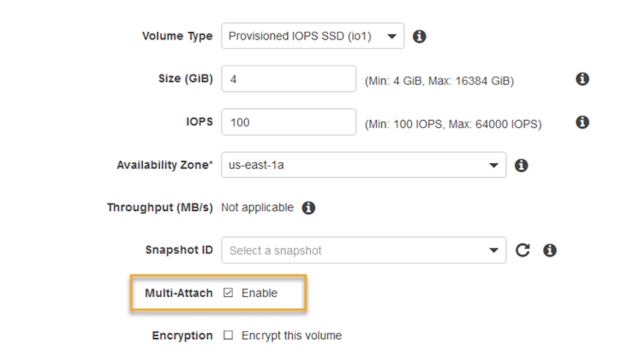
Are you exhausted from the complexities and the extra cost associated with the EFS? What if you simply need to share the EBS volume between two EC2 instances? Say no more - Amazon Web Services has an answer for you! Starting today, customers running Linux on Amazon Elastic Compute Cloud (EC2) can take advantage of new support for  attaching  Provisioned IOPS ( io1 ) EBS volumes to  multiple EC2 instances , at  no extra charge ! Multi-Attach option in EBS According to AWS, the Multi-Attach capability makes it easier to achieve higher availability for applications that provide write-ordering to maintain storage consistency. Consider the following scenario: you are running a web application behind the load balancer, and the application expects static assets, such as WordPress media uploads, theme or configuration files, shared between the instances. Instead of using EFS, you could create new PIOPS EBS volume with the Multi-Attach option, mount t...

Amazon Announced New S3 Usability Enhancements

Image
Amazon S3 Adds Two New Long-Awaited Features Bucket Limit Increase You can now increase your Amazon S3 bucket limit per AWS account. All AWS accounts have a default bucket limit of 100 buckets, and starting today you can now request additional buckets by visiting AWS Service Limits. Read-after-write Consistency Amazon S3 now supports read-after-write consistency for new objects added to Amazon S3 in US Standard region. Prior to this announcement, all regions except US Standard supported read-after-write consistency for new objects uploaded to Amazon S3. With this enhancement, Amazon S3 now supports read-after-write consistency in all regions for new objects added to Amazon S3. Read-after-write consistency allows you to retrieve objects immediately after creation in Amazon S3. Now go ahead and bump the # of S3 buckets in AWS Service Limits page.

Getting Started With AWS Aurora - Part 1

Image
AWS announced Aurora  MySQL compatible database engine last November. Aurora is a fully-managed, MySQL-compatible, relational database engine that combines the speed and availability of high-end commercial databases with the simplicity and cost-effectiveness of open source databases. What is AWS Aurora? Amazon Aurora is a relational database engine that combines the speed and reliability of high-end commercial databases with the simplicity and cost-effectiveness of open source databases. It delivers up to five times the throughput of standard MySQL running on the same hardware. Amazon Aurora increases MySQL performance and availability by tightly integrating the database engine with an SSD-backed virtualized storage layer purpose-built for database workloads. Amazon Aurora's storage is fault-tolerant and self-healing. If the entire instance fails, Amazon Aurora will automatically failover to one of up to 15 read replicas. MySQL 5.6 Compatibility According to the AWS...

Use 16GB SSD for Swap on Amazon Linux c3.large Instance

Image
Amazon announced new generation C3 instance types , which are compute optimized instances, available in 5 sizes: c3.large, c3.xlarge, c3.2xlarge, c3.4xlarge and c3.8xlarge with 2, 4, 8, 16 and 32 vCPUs respectively. C3 instances will provide you with the highest performance processors and the lowest price/compute performance compared to all other Amazon EC2 instances. C3 instances also feature Enhanced Networking and SSD-based instance storage . For C3 Instances, each vCPU is a hardware hyperthread from 2.8 GHz Intel Xeon E5-2680v2 (Ivy Bridge) processors. Setting up c3.large instance with SSDs When setting up instance, make sure you add both Instance Store volumes. Its up to you how you like to set up your root storage, For this example I opted for 16GB, 480 provisioned IOPS (you need to maintain 30:1 ratio): Testing the SSD speed Once set up and server launched, we can use 2nd 16GB SSD (mounted on /dev/sdc) for swap on new Amazon Linux instance c3.large # Tes...

Amazon Route53 Health Checks Available in CloudWatch

Image
Route 53 Health Checks Website availability is utmost important if your business depends on it. There are lots of free services (and paid services, too) to constantly monitor your site's availability and send you an email if website is not available. Some of these services offer periodic checks for every 15 minutes, some in 5, and only few support checking your site's health every 60 seconds or less. While this sounds good, what can you do about when your site actually is down? Imagine scenario like this: it's 8pm Friday, nobody is in the office, tech support does not pick up the phone. And your website is down, totally. Yes, you received alert, even multiple alerts. Even some clients call, and your competitors rub hands. Here's what you can do: enable Route53 health checks and host backup site in Amazon S3 (the backup site can simply say that "Sorry, we are currently experiencing technical issues; please check back later." - it is 100 times better than...

Amazon RDS Switch to MySQL 5.5

Image
Upgrading your Amazon RDS instance from MySQL version 5.1 to MySQL 5.5 has never been easier, as Amazon Web Services announced earlier this week. Now you can modify your MySQL RDS instance using feature called Major Feature Upgrade . MySQL 5.5 includes several features and performance benefits over MySQL that may be of interest to you including enhanced multi-core scaling, better use of I/O capacity , and enhanced monitoring by means of the performance schema . MySQL 5.5 defaults to version 1.1 of the InnoDB Plugin, which improves on version 1.0 (the default for MySQL 5.1) by adding faster recovery, multiple buffer pool instances, and asynchronous I/O. Here's how you can upgrade your RDS instance: Log in to your AWS Console Go to RDS, and select your instance From Instance Actions  drop down, choose Modify Select latest version of MySQL 5.5 from the drop down, To upgrade immediately, select the Apply Immediately check box. To delay the upgrade to the next maintenance wi...

Amazon AWS Announced Fast Cross-Region EBS Snapshot Copy

Image
Today, Amazon AWS announced yet another performance update to its EC2 Cross-Region EBS Snapshot Copy. Back in December 12, 2012, they announced EBS Snapshot Copy to allow cross-region transfer of existing snapshots for better disaster recovery. Starting today, they claim they will only transfer the data that has changed since your last snapshot copy, thus transferring and storing less data and completing the copy faster. Initiating Snapshot Copy Copy Dialog Copy Progress Even when copying from the first time, the cross-region copy performance is excellent; 10GB disk snapshot was transferred and became available 7 minutes after initiating the copy. EBS Snapshot Copy is simple to use. In the AWS Management Console, you can select the snapshot to be copied, set the destination region, and start the copy. This feature can also be accessed via an EC2 Command Line Interface or an EC2 API. Read more here:  http://docs.aws.amazon.com/AWSEC2/latest/UserGu...

Amazon Announces RDS General Availability

Image
+Amazon Web Services  Relational Database Service (Amazon RDS) is a web service that makes it easy to set up, operate, and scale a relational database in the cloud. Amazon RDS gives you access to the capabilities of a familiar MySQL, Oracle or Microsoft SQL Server database engine. This means that the code, applications, and tools you already use today with your existing databases can be used with Amazon RDS. But RDS it's not just any regular cloud MySQL service. It is being used in large-scale, mission-critical applications such as Samsung SmartTV, Flipboard, Pinterest, AirBNB, NASA JPL and many-many more. We have been using Amazon RDS in Multi-AZ deployment (db.m1.large) for more than a year for our CMS PaaS, and can say only good about it. The only big downtime that we encountered was year ago, when there was major downtime in one of US-East regions which largely affected for example Netflix. Again, thanks to a cloud, we were able to relocate our databases to...