Posts

Showing posts with the label OpsWorks

How to disable AWS OpsWorks Auto-Update

Image
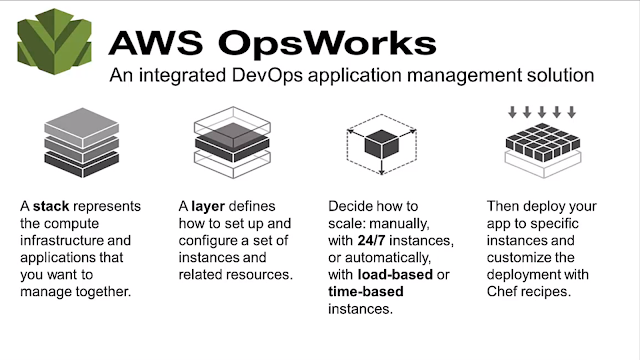
AWS OpsWorks. Image courtesy of Amazon Web Services Does AWS OpsWorks drive you nuts with its auto-update feature eating up your resources and messing up your deployments? There is now a solution to mitigate that, with manageable agent updates. This recently-added feature allows you to select if you'd like to opt in for agent auto-updates or would you like to stick to a specific (and tested by you) version of AWS OpsWorks. Go to  Add Stack  page, in the  OpsWorks Agent Version  field, choose  Manual update  and pick a version. Try this out today by editing one of your stacks to specify an agent version (be sure to do this in your test environment first). This updates the agents and cookbooks on all online instances in that stack immediately. Click the  Changelog  link to learn about the changes that come with the new agent. You can also update the agent on a single instance instead of the entire stack by selecting a version on the...

PHP Developer Cloud to be Closed on September 7, 2014

Image
I received today email notification from Zend Developer Cloud stating that the PHP Developer Cloud (phpcloud.com) will be closed on 09/07/14 for good. Quite surprise (and not so much) from a company as great as Zend. Just FYI - I tried their service only once and after 48 hours of waiting for my virtual instance to become available, I gave up. For your reference, here's the copy of whole email sent today:   Hi Jaan, You are receiving this email because you have created PHP containers on the  phpcloud.com  - Zend Developer Cloud.   When we launched Zend Developer Cloud in 2011, there were few options for PHP developers to experience Cloud development. We set out to deliver a development-only Cloud environment that could provide you a simple and frictionless way to experience development in the Cloud. In parallel, we began working with the leading cloud providers to define Zend Server-based environments that could run your projects at scale once th...

AWS OpsWorks - New Resources Tab

Image
AWS OpsWorks updated quietly their back-end today, and introduced new tab called Resources . Most interestingly, I had to update the IP address of one of our client servers because of migration from non-opsworks managed servers to new, OpsWorks managed server. And surprise - there was new tab! What you can do within the Resources tab? Register available volumes to existing stack Assign elastic IP to a different instance (even in different stack) Registering volumes You can find available volume and register volume to a Stack. Then, you can assign the volume to stopped instance, as seen on screen shot. You can change name and mounting point, if needed. Reassigning elastic IPs In my case, I had a server running with elastic IP assigned to it, and I did not want to go in and change A record because it would take too much time and it would probably upset client if DNS update may take up to 72 hours around the globe. Therefore, decided to point elastic IP to n...

OpsWorks: Deploying your PHP Application Without Restarting Apache

Image
For quite a while now I have been trying to exploit AWS OpsWorks to deploy software updates to our MetaSearch Gateway with less manual work. Before using OpsWorks, I built AWS servers from custom AMI, deployed app using git push to remote, and remote deployment hook pulled latest code updates to a folder; and if there were any secondary servers, these were updated with rsync. Now, AWS OpsWorks is great set of tools, based on famous Chef (currently 11.4 is supported). With little efforts I was able to include and configure necessary PHP extensions to a default PHP Web app: APC memcached Mongo Geoip Since AWS supports also elastic load balancer, I have two 24/7 instances running behind ELB, and third server (load-based) waiting for load to increase. Deployments are quite easy, with a push of a button, code is pulled from remote git and symlinks are updated. Sounds good? Well, too good to be true. By default, after deploying your app, Apache restarts itself; and naturally this c...

AWS OpsWorks now supports ELB!

Image
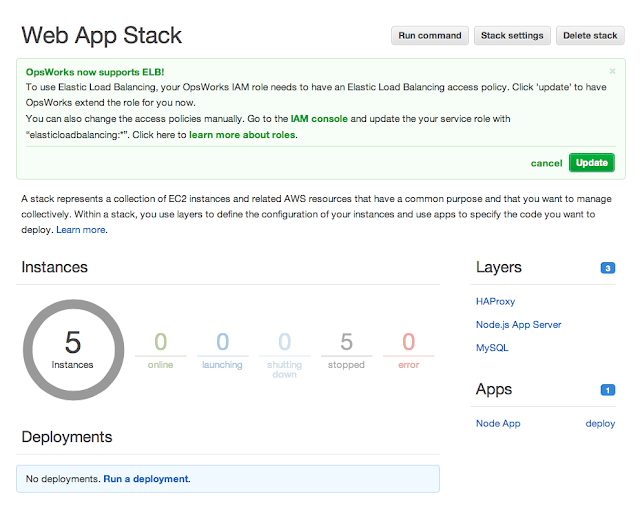
Amazon Web Services announced this long-time waited update to its OpsWorks by adding support to Elastic Load Balancer . During AWS Summit 2013 New York it was mentioned several times that ELB support will be added soon  - I am glad they kept their word. Until now, developers taking advantage of Amazon OpsWorks were forced to bring up one instance as HAProxy; but you can now add Elastic Load Balancing (ELB) to your OpsWorks application stacks and get all the built-in capabilities ELB is known for, including automatic scaling across availability zones. Combining this feature with Amazon Route53 latency based routing , and you have highly available, redundant, scalable application. Related article: AWS OpsWorks supports t1.micro instances

AWS OpsWorks Supports t1.micro Instances

Image
Amazon Web Services announced yesterday a long-awaited update to their OpsWorks product by including free tier and t1.micro instance types, something that has always keeping me away of trying OpsWorks, because smallest instance was always m1.small. You can provision now following instance types for your web, database, haproxy, e.t.c.: Micro t1.micro Standard 1st gen. m1.small m1.medium m1.large m1.xlarge Standard 2nd gen. m3.xlarge m3.2xlarge HighMEM m2.xlarge m2.2xlarge m2.4xlarge HighCPU c1.medium c1.xlarge HighIO hi1.4xlarge HighStorage hs1.8xlarge From operating systems only Amazon Linux or Ubuntu 12.04 LTS are supported. As with OpsWorks, you can launch web server stack behind HAProxy (Amazon reps say they will support Elastic Load Balancer very soon), and in addition to 24/7/365 servers you can prepare time-based servers and load-based spare servers, which will start/stop on demand, or "follow-the-sun" approach. AWS OpsWor...