Posts

Showing posts with the label EC2

How To Attach Your EBS volume to multiple EC2 instances
Image
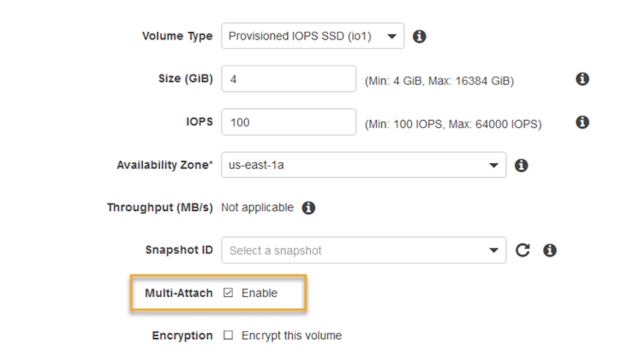
Are you exhausted from the complexities and the extra cost associated with the EFS? What if you simply need to share the EBS volume between two EC2 instances? Say no more - Amazon Web Services has an answer for you! Starting today, customers running Linux on Amazon Elastic Compute Cloud (EC2) can take advantage of new support for  attaching  Provisioned IOPS ( io1 ) EBS volumes to  multiple EC2 instances , at  no extra charge ! Multi-Attach option in EBS According to AWS, the Multi-Attach capability makes it easier to achieve higher availability for applications that provide write-ordering to maintain storage consistency. Consider the following scenario: you are running a web application behind the load balancer, and the application expects static assets, such as WordPress media uploads, theme or configuration files, shared between the instances. Instead of using EFS, you could create new PIOPS EBS volume with the Multi-Attach option, mount t...

AWS EC2 Instances Per-Second Billing

Image
AWS announced per-second billing for EC2 and EBS Volumes Effective October 2, 2017 Available for On-Demand, Reserved, and Spot Instance Types EBS Storage gains same benefits as well Also applies to Amazon EMR and AWS Batch Amazon Web Services provides flexible, secure and scalable cloud platform for the masses, and according to the Gartner Research, is a leader in this field. Today, they announced another useful feature which will change the level of the playing field again: Effective 10/02/2017, usage of Linux instances that are launched in On-Demand, Reserved, and Spot form will be billed in one-second increments. Similarly, provisioned storage for EBS volumes will be billed in one-second increments. Per-second billing also applies to Amazon EMR and AWS Batch. AWS is used by more than 1 million people from "organizations of every size across nearly every industry," Jeff Bezos wrote in his letter to shareholders. Per-second Billing Advantages With...

Enable HTTP/2 Support in AWS ELB

Image
This thread  was started more than a year ago, asking for when Amazon Web Services will add support for HTTP/2  into their ELB. In addition to that, people are also asking, how to configure ELB to support multiple SSL certificates. AWS support team has been reluctant on giving out any specific details on when both of these features will be available, citing: I've verified that the ELB team is aware of the interest in ELB supporting HTTP/2. Please keep an eye on What's New from Amazon Web Services: http://aws.amazon.com/new/ for any updates. What is HTTP/2? HTTP/2 is a replacement for how HTTP is expressed “on the wire.” It is not a ground-up rewrite of the protocol; HTTP methods, status codes and semantics are the same, and it should be possible to use the same APIs as HTTP/1.x (possibly with some small additions) to represent the protocol. HTTP/2 protocol is supported by major modern browsers including IE11, Edge 13, Firefox 47, Chrome 52, Safari 9.1, Opera 38, ...

AWS Announced Simplified Reserved Instances (no-upfront)

Image
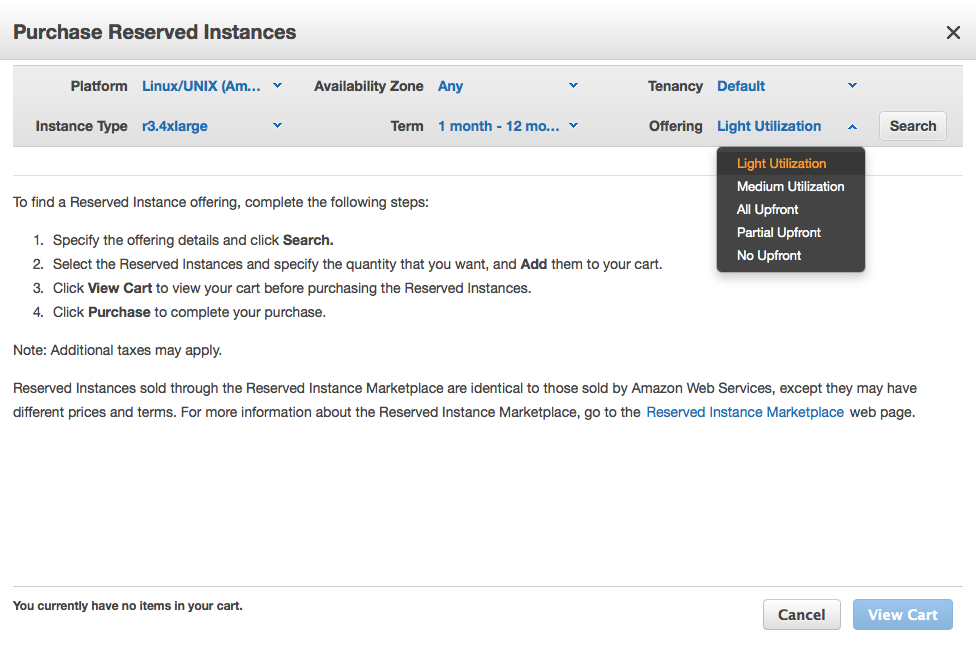
Simplifying the EC2 Reserved Instance Model There is now a single type of Reserved Instance and it has three payment options. All of the options continue to provide capacity assurance and discounts that are typically around 63% for a three year term when compared to On-Demand prices. There are three payment options that so that you can decide how you would like to pay for your Reserved Instance throughout the term (in descending order of effective discount), and you can find these new options under the Offering  settings when purchasing Reserved Instances: All Upfront -  You pay for the entire Reserved Instance term (one or three years) with one upfront payment and get the best effective hourly price when compared to On-Demand. Partial Upfront -  You pay for a portion of the Reserved Instance upfront, and then pay for the remainder over the course of the one or three year term. This option balances the RI payments between upfront and hourly No Upfront -...

MongoDB: Remove an Arbiter From a Replica Set

Image
Removing an arbiter from MongoDB Replica Set can be quite tricky, and official MongoDB documentation does not say it directly how to do it. I assume that you have auth enabled (just like I have), so lets start with connecting to your ReplicaSet "repl" master as an administrator: mongo mongo.domain.com/admin -u admin -p pass You will see the following prompt: repl:PRIMARY> Type in conf=rs.conf() repl:PRIMARY> conf = rs.conf() { "_id" : "repl", "version" : 8, "members" : [ { "_id" : 0, "host" : "mongo.server.com:27017", "priority" : 2 }, { "_id" : 1, "host" : "mongo1.server.com:27017" }, { "_id" : 2, "host" : "arbiter.server.com:27017", "arbiterOnly" : true }, { "_id" : 3, "host" : "mongo2.server.com:27017" } ] } Now lets adjus...