Posts

Showing posts with the label EBS

How To Attach Your EBS volume to multiple EC2 instances
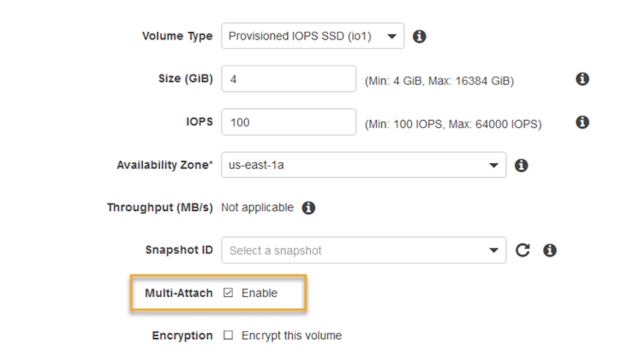
Image
Are you exhausted from the complexities and the extra cost associated with the EFS? What if you simply need to share the EBS volume between two EC2 instances? Say no more - Amazon Web Services has an answer for you! Starting today, customers running Linux on Amazon Elastic Compute Cloud (EC2) can take advantage of new support for  attaching  Provisioned IOPS ( io1 ) EBS volumes to  multiple EC2 instances , at  no extra charge ! Multi-Attach option in EBS According to AWS, the Multi-Attach capability makes it easier to achieve higher availability for applications that provide write-ordering to maintain storage consistency. Consider the following scenario: you are running a web application behind the load balancer, and the application expects static assets, such as WordPress media uploads, theme or configuration files, shared between the instances. Instead of using EFS, you could create new PIOPS EBS volume with the Multi-Attach option, mount t...

AWS EC2 Instances Per-Second Billing

Image
AWS announced per-second billing for EC2 and EBS Volumes Effective October 2, 2017 Available for On-Demand, Reserved, and Spot Instance Types EBS Storage gains same benefits as well Also applies to Amazon EMR and AWS Batch Amazon Web Services provides flexible, secure and scalable cloud platform for the masses, and according to the Gartner Research, is a leader in this field. Today, they announced another useful feature which will change the level of the playing field again: Effective 10/02/2017, usage of Linux instances that are launched in On-Demand, Reserved, and Spot form will be billed in one-second increments. Similarly, provisioned storage for EBS volumes will be billed in one-second increments. Per-second billing also applies to Amazon EMR and AWS Batch. AWS is used by more than 1 million people from "organizations of every size across nearly every industry," Jeff Bezos wrote in his letter to shareholders. Per-second Billing Advantages With...

Use 16GB SSD for Swap on Amazon Linux c3.large Instance

Image
Amazon announced new generation C3 instance types , which are compute optimized instances, available in 5 sizes: c3.large, c3.xlarge, c3.2xlarge, c3.4xlarge and c3.8xlarge with 2, 4, 8, 16 and 32 vCPUs respectively. C3 instances will provide you with the highest performance processors and the lowest price/compute performance compared to all other Amazon EC2 instances. C3 instances also feature Enhanced Networking and SSD-based instance storage . For C3 Instances, each vCPU is a hardware hyperthread from 2.8 GHz Intel Xeon E5-2680v2 (Ivy Bridge) processors. Setting up c3.large instance with SSDs When setting up instance, make sure you add both Instance Store volumes. Its up to you how you like to set up your root storage, For this example I opted for 16GB, 480 provisioned IOPS (you need to maintain 30:1 ratio): Testing the SSD speed Once set up and server launched, we can use 2nd 16GB SSD (mounted on /dev/sdc) for swap on new Amazon Linux instance c3.large # Tes...

Amazon AWS Announced Fast Cross-Region EBS Snapshot Copy

Image
Today, Amazon AWS announced yet another performance update to its EC2 Cross-Region EBS Snapshot Copy. Back in December 12, 2012, they announced EBS Snapshot Copy to allow cross-region transfer of existing snapshots for better disaster recovery. Starting today, they claim they will only transfer the data that has changed since your last snapshot copy, thus transferring and storing less data and completing the copy faster. Initiating Snapshot Copy Copy Dialog Copy Progress Even when copying from the first time, the cross-region copy performance is excellent; 10GB disk snapshot was transferred and became available 7 minutes after initiating the copy. EBS Snapshot Copy is simple to use. In the AWS Management Console, you can select the snapshot to be copied, set the destination region, and start the copy. This feature can also be accessed via an EC2 Command Line Interface or an EC2 API. Read more here:  http://docs.aws.amazon.com/AWSEC2/latest/UserGu...