Posts

Use 16GB SSD for Swap on Amazon Linux c3.large Instance

Image
Amazon announced new generation C3 instance types , which are compute optimized instances, available in 5 sizes: c3.large, c3.xlarge, c3.2xlarge, c3.4xlarge and c3.8xlarge with 2, 4, 8, 16 and 32 vCPUs respectively. C3 instances will provide you with the highest performance processors and the lowest price/compute performance compared to all other Amazon EC2 instances. C3 instances also feature Enhanced Networking and SSD-based instance storage . For C3 Instances, each vCPU is a hardware hyperthread from 2.8 GHz Intel Xeon E5-2680v2 (Ivy Bridge) processors. Setting up c3.large instance with SSDs When setting up instance, make sure you add both Instance Store volumes. Its up to you how you like to set up your root storage, For this example I opted for 16GB, 480 provisioned IOPS (you need to maintain 30:1 ratio): Testing the SSD speed Once set up and server launched, we can use 2nd 16GB SSD (mounted on /dev/sdc) for swap on new Amazon Linux instance c3.large # Tes...

HowTo: MongoDB Tailable Cursors in Node.js

Image
MongoDB capped collections are great storing volatile information, like access and debug logs. If you need to monitor regular log file, you would probably type something like this in your command line: tail -f /var/log/access_log . Cool thing is that you can do the same with MongoDB capped collections : Capped collections are fixed-size collections that support high-throughput operations that insert, retrieve, and delete documents based on insertion order. Capped collections work in a way similar to circular buffers: once a collection fills its allocated space, it makes room for new documents by overwriting the oldest documents in the collection. Creating a capped collection is easy; so lets create capped collection named log and size of 16MB (the maximum size of BSON object if you did not know): mongo localhost/test > db.createCollection( "log", { capped: true, size: 16777216 } ) Capped collections act like any other collections, but they work in first-in-first-ou...

Elastic Load Balancing Supports Cross-Zone Load Balancing

Image
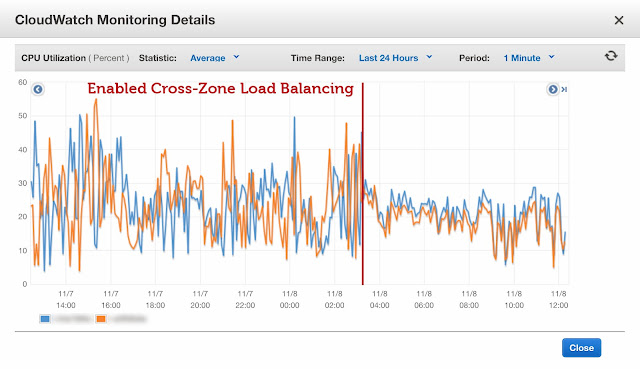
Amazon Web Services announced cross-zone load balancer, which supposed to further improve distribution of requests amongst all the instances behind the load balancer. If you enable cross-zone load balancing, you no longer have to worry that clients caching DNS information will result in requests being distributed unevenly, resulting more even load. I went ahead and tried it out myself. Enabling the Cross-Zone Load Balancing goes through the command line, you need to download and configure the tool on your computer before proceeding. Read the instructions how to download, install and configure ELB command line tools here . List all the load balancers: elb-describe-lbs Enable the cross-zone load balancing elb-modify-lb-attributes loadbalancer-id --crosszoneloadbalancing "enabled=true" Verifying: elb-describe-lb-attributes  loadbalancer-id  --headers CROSS_ZONE_LOADBALANCING  CROSS_ZONE_LOADBALANCING_ATTRIBUTE_VALUE CROSS_ZONE_LOADBALANCING  true ...

MongoDB Certified DBA

Image
MongoDB University Offers Comprehensive Exams Worldwide NEW YORK, NY- Nov 6, 2013 - I am very glad to announce that I have earned certification as a MongoDB Certified DBA, Associate Level .  About a month ago, I was offered to try out MongoDB Certified DBA exam as part of a pilot project, invitations only. Before that, I successfully passed both M101 and M102P courses (well that was almost a year ago).  Invitations were sent to a selected group only, and only 150 first were given a chance to try that exam. It was thrilling to receive congratulating email in my inbox today, saying that I have successfully passed this quite difficult exam. Certificate number is 100-000-011 which indicates me being 11th in the world getting this (links to verify will be available little bit later). According to The 451 Group's analysis of LinkedIn® member profiles, MongoDB is the most popular NoSQL database and now accounts for 49 percent of all mentions of NoSQL technologies. The ...

AWS OpsWorks - New Resources Tab

Image
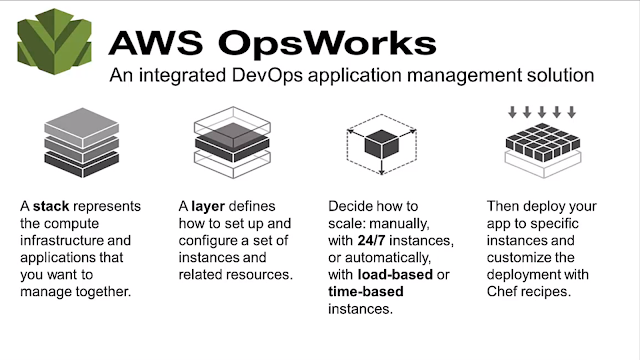
AWS OpsWorks updated quietly their back-end today, and introduced new tab called Resources . Most interestingly, I had to update the IP address of one of our client servers because of migration from non-opsworks managed servers to new, OpsWorks managed server. And surprise - there was new tab! What you can do within the Resources tab? Register available volumes to existing stack Assign elastic IP to a different instance (even in different stack) Registering volumes You can find available volume and register volume to a Stack. Then, you can assign the volume to stopped instance, as seen on screen shot. You can change name and mounting point, if needed. Reassigning elastic IPs In my case, I had a server running with elastic IP assigned to it, and I did not want to go in and change A record because it would take too much time and it would probably upset client if DNS update may take up to 72 hours around the globe. Therefore, decided to point elastic IP to n...

OpsWorks: Deploying your PHP Application Without Restarting Apache

Image
For quite a while now I have been trying to exploit AWS OpsWorks to deploy software updates to our MetaSearch Gateway with less manual work. Before using OpsWorks, I built AWS servers from custom AMI, deployed app using git push to remote, and remote deployment hook pulled latest code updates to a folder; and if there were any secondary servers, these were updated with rsync. Now, AWS OpsWorks is great set of tools, based on famous Chef (currently 11.4 is supported). With little efforts I was able to include and configure necessary PHP extensions to a default PHP Web app: APC memcached Mongo Geoip Since AWS supports also elastic load balancer, I have two 24/7 instances running behind ELB, and third server (load-based) waiting for load to increase. Deployments are quite easy, with a push of a button, code is pulled from remote git and symlinks are updated. Sounds good? Well, too good to be true. By default, after deploying your app, Apache restarts itself; and naturally this c...

MongoDB Backup Strategies with Write-Heavy Applications

Image
The MongoDB Management Service  Backup announced earlier in May provides excellent backup and restore capabilities for your MongoDB replica set cluster. Setting up MongoDB backup is quite easy: Sign Up for service, Provide credit card details Install and configure agent In ~ 10 minutes your replica set is backed up and backup agent starts transferring the oplog data to backup mothership. Price for snapshot creating and storage is negligible, compared to the price ($2/GB) for oplog processing. For example, previous invoice was $0.89 for 330GB Snapshot storage, $0.65 for 71GB for snapshot create and $155 for 77GB of oplog traffic.  After analyzing my application, I figured out that most of the traffic was caused by two collections: metalog - 1GB capped collection which stores every API request with details opcounters - this stores various opcounters; every minute new document is created and $inc operator increases various counter(s) by one, depending on action, ...